
On this page
About Filter / effects
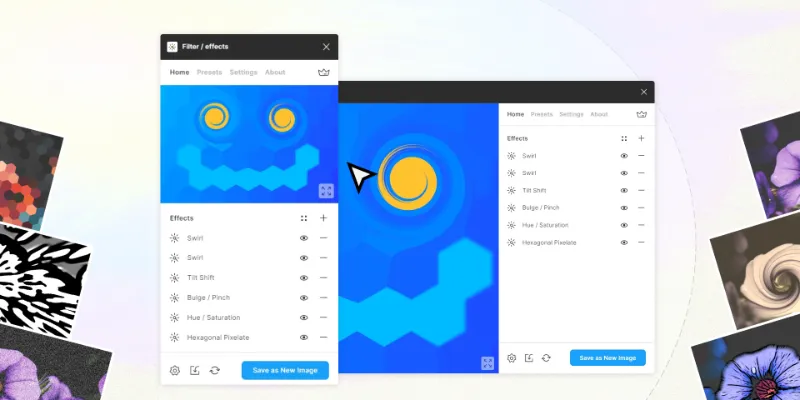
Filter / effects is a free + paid features Figma plugin published by Andreslav Kozlov in 2019. It works in Figma Design and FigJam and has 342,473 users and 4,024 likes on the Figma Community. It ranks #2 in Images & Stock Photos and #5 in Effects & Textures on our lists.
In the developer's words
A powerful Filter breaks into your workflow!
There are currently more than 60 customizable effects available.
How to use it:
– Select one image or node (depends on the Select fill-image only setting).
– Save Image!
— The plugin allows you to edit the applied effects. To do this, you need to apply it to the original fill-image or node.
— The plugin allows you to work with the image of a node (including a slice). To do this, disable the Select fill-image only parameter.
Effects
1. Metaball Gradient Mesh (premium);
2. Brightness Contras;
3. Hue Saturation;
4. Curves;
5. Curves HSL;
6. Chromatic Aberration (premium);
7. Gradient Map (premium);
8. Lavels (premium);
9. Gamma;
10. Soft Contrast ;
11. Sepia;
12. Vibrance;
13. Grayscale;
14. Mono;
15. Noise RGB;
16. Noise HSL;
17. Simplex Noise;
18. Noise Displace;
19. Fluid Destruction;
20. Ripple;
21. Sharpen;
22. Sharpen Luminance;
23. Unsharp Mask;
24. Gaussian Blur;
25. Lens Blur;
26. Triangle Blur;
27. Tilt Shift;
28. Zoom Blur;
29. Denoise;
30. Droplets on water (premium);
31. Ripple Propagation (premium);
32. Ink;
33. Cartoon;
34. Posterization (premium);
35. Flat Chromatic Aberration (premium);
36. Emboss;
37. Crosshatch;
38. Night;
39. Bleach;
40. Neon;
41. Lsd;
42. Edge Work;
43. BlackWhite;
44. Outline;
45. Symbols;
46. Euphoria (premium);
47. Light Rays;
48. Lomo;
49. Night Vision;
50. Vignette;
51. Color Halftone;
What's new
Version 65 · released Jan 18, 2024
The developer didn't publish release notes for this version.
Permissions and privacy
Network access
Filter / effects can only connect to the 4 domains declared in its manifest: lead.h1n.ru/, wss://*.firebaseio.com, *.firebaseio.com and rsms.me/inter/font-files/.
- lead.h1n.ru/
- wss://*.firebaseio.com
- *.firebaseio.com
- rsms.me/inter/font-files/
Extra permissions
None beyond the standard access to the file you run it in.
Read from the plugin's published manifest.
Where Filter / effects ranks
Filter / effects alternatives
- 1

Photopea
by Patrik Schiller
441K users7.1KFreeOnline Photo Editor
- 2

Insert Big Image
by Yuan Qing Lim
224K users4KFree + paid featuresInsert and retain the original resolution of big images
- 3
Color Overlay
by Jaclyn Tan
209K users1.3KFree + $10 upgradeRecolor raster images quickly and easily
- 4

Downsize
by Alex Einarsson
147K users2.2KFreeCompress and resize images without leaving Figma!
- 5
Image Editor
by Pavel Laptev
129K users2.4KFreeeditor, photo, image editor, photoshop, image filter
- 6

Avatars
by Alohe
68K users868FreeAvatars is a comprehensive collection of diverse and eye-catching avatar images
Filter / effects FAQ
What does Filter / effects do?
Modify images more than 50 different effects right in Figma. It's a Figma plugin by Andreslav Kozlov that runs in Figma Design and FigJam.
Is Filter / effects free?
Filter / effects is free to install, but some features are unlocked through a paid plan on the developer's site.
Is Filter / effects safe to use?
Figma plugins can only reach the internet through domains listed in their manifest. Filter / effects can only connect to the 4 domains declared in its manifest: lead.h1n.ru/, wss://*.firebaseio.com, *.firebaseio.com and rsms.me/inter/font-files/. As with any plugin, check the developer's privacy policy before using it on client work.
How do I install Filter / effects?
Open it on the Figma Community, or search for it in the Actions menu (Cmd/Ctrl + K) inside any file you can edit. See how to install Figma plugins.
What are the best alternatives to Filter / effects?
By user count, the closest alternatives are Photopea, Insert Big Image and Color Overlay. Compare all of them on the best Figma plugins for images & stock photos.
Built this plugin?
Use this page as a landing page for Filter / effects: link to it from your site, README or launch posts, or add a badge. Pick a style and copy the code.

Style
Label
Size
Code
<a href="https://figmaplugins.co/plugins/filter-effects/" target="_blank" rel="noopener"><img src="https://figmaplugins.co/badges/featured-dark.svg" alt="Filter / effects on figmaplugins.co" width="220" height="48"></a>