
On this page
About Higgsfield AI
Higgsfield AI is a free Figma plugin published by Dastan Tynyshtyk in 2026. It works in Figma Design and FigJam and has 3,874 users and 215 likes on the Figma Community. It ranks #13 in New in 2026 on our lists.
In the developer's words
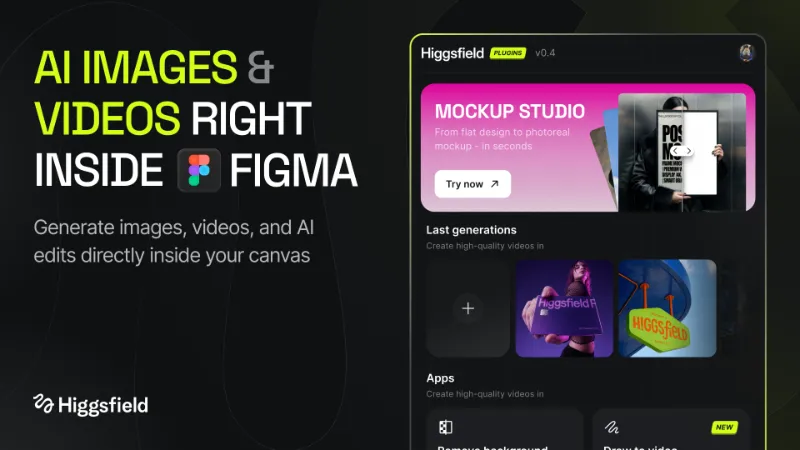
Remove background, create mockups, swap faces, and generate AI images & videos — all in one Figma plugin. The complete AI creative studio: background remover, mockup generator, face swap, AI photoshoot, relight, expand, and new camera angles.
What's inside
- Remove Background— One-click background remover. Clean edges, transparent PNG, no masking.
- Mockup Studio— Mockup generator with thousands of scenes: devices, packaging, apparel, branding.
- Face Swap — AI face swap that keeps pose and lighting. Consistent identity across frames.
- AI Image Generation — Text-to-image with 30+ models for products, lifestyle, and portraits.
- AI Video Generation — Text-to-video and image-to-video with cinematic camera moves.
- Color Grading — Cinematic LUTs and color presets in one tap.
- Relight — Change lighting direction, intensity, and color temperature without a reshoot.
- Expand (Generative Fill)— Generative outpainting that extends any image into a banner or hero.
- Angles — New camera angles of the same subject — front, side, three-quarter, top-down.
Most popular use cases
- Background remover— cut out products, people, and logos for landing pages and ads
- Product mockup generator — turn flat designs into realistic mockups
- AI face swap — swap faces in models and characters while keeping the scene
- AI photoshoot — generate studio-quality product photos without a camera
- AI image generator for Figma — generate on-brand images directly on the canvas
- AI video generator — animate hero images and ad creatives
How to use
- Run the Higgsfield AI plugin from your Figma file.
- Pick a tool from the Apps grid — Remove Background, Mockup, Face Swap, Image generation, Video generation, Color Grading, Relight, Expand, Angles.
- Drop in a prompt or select an image on the canvas.
- Preview and insert the result back into your file — fully editable as a Figma layer.
Why designers choose Higgsfield AI
- The only Figma plugin combining background remover + mockup generator + face swap + AI image & video — no more tool-switching.
- Studio-grade visuals without a photographer, model, or studio.
- Generate matching variants — formats, sizes, languages, faces, backgrounds — in batches.
- Designed for product pages, ad creatives, pitch decks, and brand campaigns.
Built for
- Product designers shipping landing pages and marketing sites
- Brand and creative teams producing ad sets and campaigns
- Founders and indie builders who need studio visuals on a startup budget
- UI/UX designers prototyping with realistic content
- Built by Higgsfield AI — the AI creative platform trusted by millions of creators.
What's new
Version 15 · released Jun 5, 2026
The developer didn't publish release notes for this version.
Permissions and privacy
Network access
Higgsfield AI can only connect to the 9 domains declared in its manifest: higgsfield.ai, cms.higgsfield.ai, cdn.higgsfield.ai, *.higgsfield.ai, images.higgs.ai, static.higgsfield.ai, *.amazonaws.com, *.cloudfront.net and *.cloudflarestorage.com.
- higgsfield.ai
- cms.higgsfield.ai
- cdn.higgsfield.ai
- *.higgsfield.ai
- images.higgs.ai
- static.higgsfield.ai
- *.amazonaws.com
- *.cloudfront.net
- *.cloudflarestorage.com
Extra permissions
None beyond the standard access to the file you run it in.
Read from the plugin's published manifest.
Where Higgsfield AI ranks
Higgsfield AI alternatives
- 1
HTML to Figma
by Morty
22K users565FreeImport HTML and convert web layouts into editable Figma designs
- 2
 9K users245Free
Buddy - Your Figma AI design partner, living right inside Figma.
- 3
Text on path
by Aleksei Kipin
8.8K users62FreePlace text on paths and shapes — curves, circles, and custom vectors.
- 4

CANVA Export
by willabs
8.4K users111FreeExport Figma to Canva Design
- 5

Perspective Distort
by Aleks. Keda
8.2K users111FreeApply realistic 3D perspective transformations to any vector shape
- 6
Layerize: Image to Figma AI
by David
6.2K users95FreeFREE: Screenshot to Figma!! Convert image to Figma design!
Higgsfield AI FAQ
What does Higgsfield AI do?
Generate images, videos, and design. Drag them into your canvas. It's a Figma plugin by Dastan Tynyshtyk that runs in Figma Design and FigJam.
Is Higgsfield AI free?
Yes. Higgsfield AI is free to install and run from the Figma Community, with no paid tier listed.
Is Higgsfield AI safe to use?
Figma plugins can only reach the internet through domains listed in their manifest. Higgsfield AI can only connect to the 9 domains declared in its manifest: higgsfield.ai, cms.higgsfield.ai, cdn.higgsfield.ai, *.higgsfield.ai, images.higgs.ai, static.higgsfield.ai, *.amazonaws.com, *.cloudfront.net and *.cloudflarestorage.com. As with any plugin, check the developer's privacy policy before using it on client work.
How do I install Higgsfield AI?
Open it on the Figma Community, or search for it in the Actions menu (Cmd/Ctrl + K) inside any file you can edit. See how to install Figma plugins.
What are the best alternatives to Higgsfield AI?
By user count, the closest alternatives are HTML to Figma by Morty, Buddy Figma AI agent:Claude design to Figma,Codex HTML UX generator Co-pilot assistant for Designers and Text on path. Compare all of them on the best Figma plugins for new in 2026.
Built this plugin?
Use this page as a landing page for Higgsfield AI: link to it from your site, README or launch posts, or add a badge. Pick a style and copy the code.

Style
Label
Size
Code
<a href="https://figmaplugins.co/plugins/higgsfield-ai/" target="_blank" rel="noopener"><img src="https://figmaplugins.co/badges/featured-dark.svg" alt="Higgsfield AI on figmaplugins.co" width="220" height="48"></a>