
On this page
About Magnific
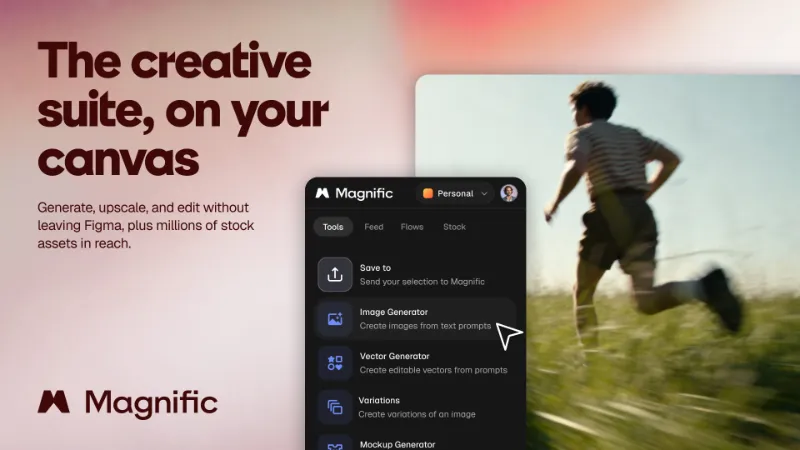
Magnific is a free Figma plugin published by Jose Ballestas in 2026. It works in Figma Design and has 27,283 users and 1,179 likes on the Figma Community. It ranks #2 in New in 2026 and #15 in GIF & Video on our lists.
In the developer's words
Generate images and editable vectors, upscale with the famous Magnific upscaler, remove backgrounds, relight, and drop in stock, all without leaving Figma. The complete Magnific creative suite on your canvas, work on individual images or in bulk.
Tools available
Image Generator: Text-to-image from a full lineup of the latest models. Pick an aspect ratio, add reference images, and generate one image or a whole batch.
Vector Generator: Text-to-vector that lands on your canvas as real, editable vector layers. No tracing, no flattening.
Image Upscaler: The Magnific upscaler, built in. Take images to 2x, 4x, 8x, or 16x, in creative or precision mode.
Remove Background: One-click cutout with clean edges and a transparent result. No masking.
Relight: Change lighting direction, color, and atmosphere with a 3D orbit control. No reshoot needed.
Change Camera: New angles and lenses of the same subject, steered with a 3D orbit gizmo. Front, side, three-quarter, and more.
Skin Enhancer:Retouch and enhance skin with faithful, creative, or flexible modes.
Mockup Generator: Drop flat designs into real scenes, one at a time or in bulk.
Variations:Fresh takes on any selected design in seconds, reframe it, storyboards, multiple ethnicities, age and more.
Save to Magnific:Send any selection to your Magnific folders, Spaces.
Stock: Search and drag in photos, vectors, icons, and video. Curated categories for portraits, products, backgrounds, nature, icons by style, and more.
Flows: Run prebuilt Magnific AI workflows right inside the plugin.
How to use
1. Run Magnific from your Figma file and sign in with your Magnific account.
2. Pick a tool from the grid, or open Stock, Feed, or Flows.
3. Drop in a prompt or select an image on your canvas.
4. Preview the result and insert it back as an editable Figma layer, or drag it straight onto the canvas.
Get the most out of Magnific inside Figma
The Magnific upscaler and a full AI image studio in one plugin, so you stop switching between tools.
Vectors and results come back as editable Figma layers, not flattened images.
Generate matching variants and mockups in batches: formats, scenes, and backgrounds at once.
A built-in library of stock photos, vectors, icons, and video, draggable onto the canvas.
Studio-grade visuals without a photographer, model, or studio.
Built by Magnific, formerly Freepik.
What's new
Version 2 · released Jul 6, 2026
- Responsive layout
Permissions and privacy
Network access
Magnific can only connect to the 7 domains declared in its manifest: magnific.com, *.magnific.com, *.flaticon.com, storage.googleapis.com, *.googleusercontent.com, *.cdnpk.net and eu.i.posthog.com.
- magnific.com
- *.magnific.com
- *.flaticon.com
- storage.googleapis.com
- *.googleusercontent.com
- *.cdnpk.net
- eu.i.posthog.com
Extra permissions
None beyond the standard access to the file you run it in.
Read from the plugin's published manifest.
Where Magnific ranks
Magnific alternatives
- 1
HTML to Figma
by Neil
45K users1.1KFreeImport HTML and convert web layouts into editable Figma designs
- 2
 9K users245Free
Buddy - Your Figma AI design partner, living right inside Figma.
- 3

Text on path
by Aleksei Kipin
8.8K users62FreePlace text on paths and shapes — curves, circles, and custom vectors.
- 4

CANVA Export
by willabs
8.4K users111FreeExport Figma to Canva Design
- 5

Perspective Distort
by Aleks. Keda
8.2K users111FreeApply realistic 3D perspective transformations to any vector shape
- 6

Layerize
by David
6.2K users95FreeFREE: Screenshot to Figma!! Convert image to Figma design!
Magnific FAQ
What does Magnific do?
Create images, video, designs. It's a Figma plugin by Jose Ballestas that runs in Figma Design.
Is Magnific free?
Yes. Magnific is free to install and run from the Figma Community, with no paid tier listed.
Is Magnific safe to use?
Figma plugins can only reach the internet through domains listed in their manifest. Magnific can only connect to the 7 domains declared in its manifest: magnific.com, *.magnific.com, *.flaticon.com, storage.googleapis.com, *.googleusercontent.com, *.cdnpk.net and eu.i.posthog.com. As with any plugin, check the developer's privacy policy before using it on client work.
How do I install Magnific?
Open it on the Figma Community, or search for it in the Actions menu (Cmd/Ctrl + K) inside any file you can edit. See how to install Figma plugins.
What are the best alternatives to Magnific?
By user count, the closest alternatives are HTML to Figma by Neil, Buddy Figma AI agent:Claude design to Figma,Codex HTML UX generator Co-pilot assistant for Designers and Text on path. Compare all of them on the best Figma plugins for new in 2026.
Built this plugin?
Use this page as a landing page for Magnific: link to it from your site, README or launch posts, or add a badge. Pick a style and copy the code.

Style
Label
Size
Code
<a href="https://figmaplugins.co/plugins/magnific/" target="_blank" rel="noopener"><img src="https://figmaplugins.co/badges/featured-dark.svg" alt="Magnific on figmaplugins.co" width="220" height="48"></a>