
On this page
About i Print CMYK PDF
i Print CMYK PDF is a free Figma plugin published by Tutu in 2025. It works in Figma Design and has 22,745 users and 178 likes on the Figma Community. It ranks #9 in PDF & Print on our lists.
In the developer's words
i Print brings a practical print design workflow to Figma.
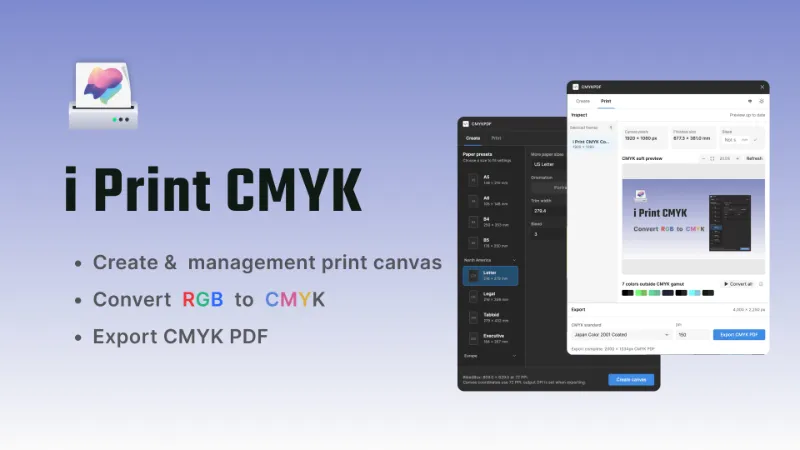
Create print canvases from common international and regional paper sizes, or prepare existing Figma frames for print without changing their original dimensions. Set finished paper size, bleed, content margins, artwork fitting, alignment, output DPI, and CMYK profile—all directly inside Figma.
Preview your selected frames in CMYK, compare them with the original RGB artwork, and run preflight checks for common print issues such as out-of-gamut colors, insufficient image resolution, small text, thin strokes, safety-margin conflicts, and unsupported export dimensions.
Choose from built-in ICC profiles, download additional regional profiles, or upload your own CMYK ICC profile for the current session.
When your artwork is ready, export multiple selected frames as a single high-resolution, multi-page, four-channel CMYK PDF. Each page is generated with the selected ICC profile, configurable DPI, and correctly defined BleedBox and TrimBox.
Designed for multidisciplinary designers creating posters, flyers, brochures, cards, marketing materials, packaging drafts, and other everyday print projects in Figma.
What's new
Version 15 · released Sep 4, 2026
The developer didn't publish release notes for this version.
Permissions and privacy
Network access
i Print CMYK PDF can only connect to the domain declared in its manifest: tutop.top.
- tutop.top
Extra permissions
- Reads your Figma name and avatar
Read from the plugin's published manifest.
Where i Print CMYK PDF ranks
i Print CMYK PDF alternatives
- 1

Print for Figma
by Ben Katz
268K users3.8KFree + $12/mo upgradePrint-ready CMYK PDF export from Figma - bleed, crop marks, ICC profiles & DPI
- 2

Compressed PDF and Image Exporter
by Taylor Osborn
147K users558Free + paid featuresExport compressed PDFs and images at efficient file sizes from Figma while controlling for quality.
- 3

Free Compressed PDF and Image Exporter
by Compressify
102K users750FreeExport compressed PNG, PDF, JPG, SVG, WebP & merge multiple frames into one PDF—fast & easy! 🚀
- 4

Printery
by Storyship
58K users461Free + paid featuresCMYK PDF export with bleed, crop marks, ICC profiles, spot colors & DPI control.
- 5

Export PDF
by Kuntal
41K users426FreeLet the minions export your artboards to high-quality PDFs—fast and free! 🐱
- 6

PDF Viewer
by Stas Haas
35K users91FreePreview PDF files
i Print CMYK PDF FAQ
What does i Print CMYK PDF do?
Create and management print document, preview CMYK color shifts, and export color-managed CMYK PDF. It's a Figma plugin by Tutu that runs in Figma Design.
Is i Print CMYK PDF free?
Yes. i Print CMYK PDF is free to install and run from the Figma Community, with no paid tier listed.
Is i Print CMYK PDF safe to use?
Figma plugins can only reach the internet through domains listed in their manifest. i Print CMYK PDF can only connect to the domain declared in its manifest: tutop.top. As with any plugin, check the developer's privacy policy before using it on client work.
How do I install i Print CMYK PDF?
Open it on the Figma Community, or search for it in the Actions menu (Cmd/Ctrl + K) inside any file you can edit. See how to install Figma plugins.
What are the best alternatives to i Print CMYK PDF?
By user count, the closest alternatives are Print for Figma, Compressed PDF and Image Exporter and Free Compressed PDF and Image Exporter. Compare all of them on the best Figma plugins for pdf & print.
Built this plugin?
Use this page as a landing page for i Print CMYK PDF: link to it from your site, README or launch posts, or add a badge. Pick a style and copy the code.

Style
Label
Size
Code
<a href="https://figmaplugins.co/plugins/i-print-cmyk/" target="_blank" rel="noopener"><img src="https://figmaplugins.co/badges/featured-dark.svg" alt="i Print CMYK PDF on figmaplugins.co" width="220" height="48"></a>Want it featured on figmaplugins.co? Submit it for review