
On this page
About Layerize: Image to Figma AI
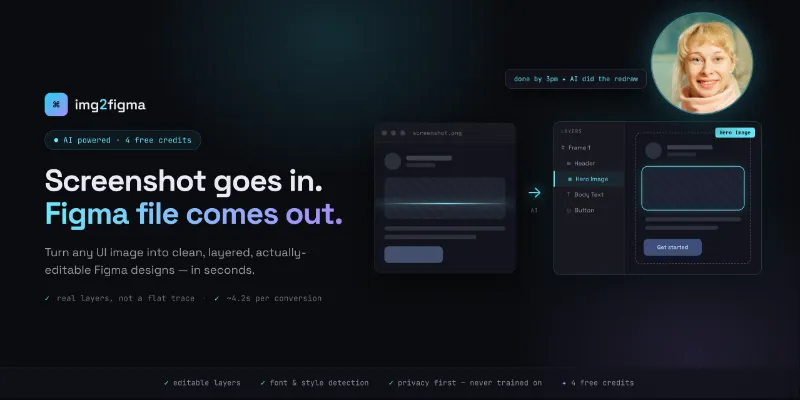
Layerize: Image to Figma AI is a free Figma plugin published by David in 2026. It works in Figma Design and has 6,216 users and 95 likes on the Figma Community. It ranks #6 in New in 2026 on our lists.
In the developer's words
From Image to Figma. Instantly and FREE. Turn Images into Editable Figma Designs for FREE!
Upload a screenshot or image and get a fully editable Figma design in seconds.
Watch: https://www.youtube.com/watch?v=MzNl_etS0uk
Whether it’s a screenshot of a real product or an AI-generated image fromIdeogram or Nano Banana, the plugin converts it into clean Figma layers you can immediately edit.
No rebuilding. No waste of time.
What It Does
- Convert images and screenshots to Figma designs
- Turn image to design with real layers and structure
- Go from screenshot to design without manual redraw
- Works with AI image to design workflows
- Outputs editable Figma designs, ready for iteration
Why Designers Love It
- Clean, Editable Layers:Proper hierarchy, containers, lists, and spacing.
- Font & Style Detection: Typography and visual style preserved.
- Built for AI Workflows: Prompt → image → Figma design.
- Privacy First:Your images and designs are never used for training without permission.
- Free Credits: every new account gets free credits!
Design Starts with an Image
It’s 2026.
Inspiration comes first - We turn it into design!
Learn more: https://imageeditorfigma.com/blog/
Support: 4daviddivat4@gmail.com
What's new
Version 36 · released Apr 13, 2026
The developer didn't publish release notes for this version.
Permissions and privacy
Network access
Layerize: Image to Figma AI can only connect to the 3 domains declared in its manifest: imageeditorfigma.com, wss://imageeditorfigma.com and wss://5lvbae46ac.execute-api.eu-north-1.amazonaws.com/v1.
- imageeditorfigma.com
- wss://imageeditorfigma.com
- wss://5lvbae46ac.execute-api.eu-north-1.amazonaws.com/v1
Extra permissions
- Reads your Figma name and avatar
Read from the plugin's published manifest.
Where Layerize: Image to Figma AI ranks
Layerize: Image to Figma AI alternatives
- 1
HTML to Figma
by Morty
22K users565FreeImport HTML and convert web layouts into editable Figma designs
- 2
 9K users245Free
Buddy - Your Figma AI design partner, living right inside Figma.
- 3

Text on path
by Aleksei Kipin
8.8K users62FreePlace text on paths and shapes — curves, circles, and custom vectors.
- 4

CANVA Export
by willabs
8.4K users111FreeExport Figma to Canva Design
- 5
Perspective Distort
by Aleks. Keda
8.2K users111FreeApply realistic 3D perspective transformations to any vector shape
- 6

Magic Eraser
by M4JOR
6.2K users14FreeInstantly remove anything from your designs
Layerize: Image to Figma AI FAQ
What does Layerize: Image to Figma AI do?
FREE: Screenshot to Figma!! Convert image to Figma design. It's a Figma plugin by David that runs in Figma Design.
Is Layerize: Image to Figma AI free?
Yes. Layerize: Image to Figma AI is free to install and run from the Figma Community, with no paid tier listed.
Is Layerize: Image to Figma AI safe to use?
Figma plugins can only reach the internet through domains listed in their manifest. Layerize: Image to Figma AI can only connect to the 3 domains declared in its manifest: imageeditorfigma.com, wss://imageeditorfigma.com and wss://5lvbae46ac.execute-api.eu-north-1.amazonaws.com/v1. As with any plugin, check the developer's privacy policy before using it on client work.
How do I install Layerize: Image to Figma AI?
Open it on the Figma Community, or search for it in the Actions menu (Cmd/Ctrl + K) inside any file you can edit. See how to install Figma plugins.
What are the best alternatives to Layerize: Image to Figma AI?
By user count, the closest alternatives are HTML to Figma by Morty, Buddy Figma AI agent:Claude design to Figma,Codex HTML UX generator Co-pilot assistant for Designers and Text on path. Compare all of them on the best Figma plugins for new in 2026.
Built this plugin?
Use this page as a landing page for Layerize: Image to Figma AI: link to it from your site, README or launch posts, or add a badge. Pick a style and copy the code.

Style
Label
Size
Code
<a href="https://figmaplugins.co/plugins/layerize-image-to-figma-ai/" target="_blank" rel="noopener"><img src="https://figmaplugins.co/badges/featured-dark.svg" alt="Layerize: Image to Figma AI on figmaplugins.co" width="220" height="48"></a>