
On this page
About Lazy››PDF
Lazy››PDF is a free Figma plugin published by Karl Koch in 2023. It works in Figma Design and Dev Mode and has 28,448 users and 166 likes on the Figma Community. It ranks #8 in PDF & Print on our lists.
In the developer's words
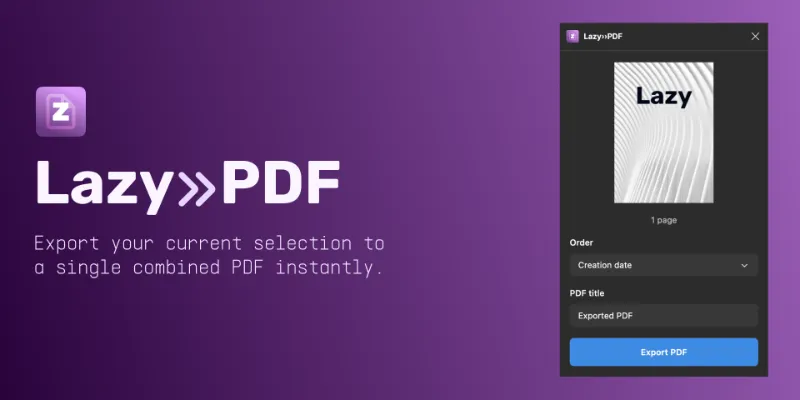
Create combined PDFs from your selection.
Exporting PDFs in Figma is great, but it's either one at a time, or everything on the page. Doc››Exporter allows you to export only the items in your selection.
- Get an instant preview of the starting file
- See the total number of items in your selection
- Set a custom title
- Pick an order type (orders by creation date by default)
- Export in a click
Lazy››PDF saves the file to the native File Browser on your computer.
What's new
Version 8 · released Sep 14, 2023
- Renames to Lazy››PDF to match my existing macOS PDF product.
- Adds support for a much requested feature: Order sorting.
- By default, your PDF will be sorted by the creation date. You can change this to be either Canvas order (which takes into account the x and y position of the object) or Frame number (which looks at a specific number you've given to a Frame and will ignore any text).
- If you choose Canvas order, you can stack your frames from left to right and top to bottom. The plugin will first move from left to right, then drop down a line and do it again, and keep going until it orders all of the files.
- If you choose Frame number, the current Canvas order will be ignored, so you can organise your page as you wish.
Permissions and privacy
Network access
Lazy››PDF declares no network access, so it runs entirely inside Figma and can't send your file anywhere.
Extra permissions
None beyond the standard access to the file you run it in.
Read from the plugin's published manifest.
Where Lazy››PDF ranks
Lazy››PDF alternatives
- 1

Print for Figma
by Ben Katz
268K users3.8KFree + $12/mo upgradePrint-ready CMYK PDF export from Figma - bleed, crop marks, ICC profiles & DPI
- 2

Compressed PDF and Image Exporter
by Taylor Osborn
147K users558Free + paid featuresExport compressed PDFs and images at efficient file sizes from Figma while controlling for quality.
- 3

Free Compressed PDF and Image Exporter
by Compressify
102K users750FreeExport compressed PNG, PDF, JPG, SVG, WebP & merge multiple frames into one PDF—fast & easy! 🚀
- 4

Printery
by Storyship
58K users461Free + paid featuresCMYK PDF export with bleed, crop marks, ICC profiles, spot colors & DPI control.
- 5

Export PDF
by Kuntal
41K users426FreeLet the minions export your artboards to high-quality PDFs—fast and free! 🐱
- 6

PDF Viewer
by Stas Haas
35K users91FreePreview PDF files
Lazy››PDF FAQ
What does Lazy››PDF do?
Create combined PDFs from your selection. It's a Figma plugin by Karl Koch that runs in Figma Design and Dev Mode.
Is Lazy››PDF free?
Yes. Lazy››PDF is free to install and run from the Figma Community, with no paid tier listed.
Is Lazy››PDF safe to use?
Figma plugins can only reach the internet through domains listed in their manifest. Lazy››PDF declares no network access, so it runs entirely inside Figma and can't send your file anywhere. As with any plugin, check the developer's privacy policy before using it on client work.
How do I install Lazy››PDF?
Open it on the Figma Community, or search for it in the Actions menu (Cmd/Ctrl + K) inside any file you can edit. See how to install Figma plugins.
What are the best alternatives to Lazy››PDF?
By user count, the closest alternatives are Print for Figma, Compressed PDF and Image Exporter and Free Compressed PDF and Image Exporter. Compare all of them on the best Figma plugins for pdf & print.
Built this plugin?
Use this page as a landing page for Lazy››PDF: link to it from your site, README or launch posts, or add a badge. Pick a style and copy the code.

Style
Label
Size
Code
<a href="https://figmaplugins.co/plugins/lazy-pdf/" target="_blank" rel="noopener"><img src="https://figmaplugins.co/badges/featured-dark.svg" alt="Lazy››PDF on figmaplugins.co" width="220" height="48"></a>Want it featured on figmaplugins.co? Submit it for review