
On this page
About Magic Eraser
Magic Eraser is a free Figma plugin published by M4JOR in 2026. It works in Figma Design and has 6,155 users and 14 likes on the Figma Community. It ranks #7 in New in 2026 on our lists.
In the developer's words
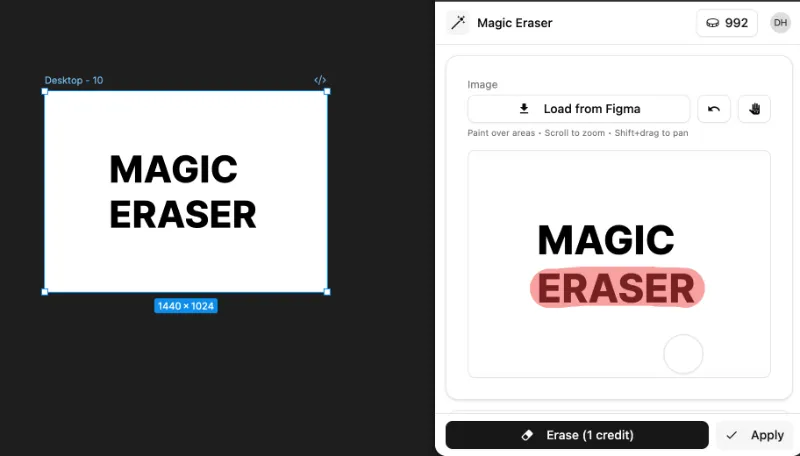
Magic Eraser lets you cleanly remove objects, text, watermarks, blemishes, or backgrounds from any image right inside Figma.
Just upload or select an image, paint over the area you want to erase, and let the AI do the rest. It's the fastest way to clean up photos and mockup assets without leaving your design workflow.
How it works:
- Select or upload an image
- Paint over what you want to remove
- Click Erase
Perfect for:
- Removing distracting backgrounds or objects from photos
- Cleaning up stock images and mockup assets
- Erasing watermarks, text overlays, or logos
- Quick touch-ups without switching to another tool
Works well with those with clear background and doesn't have any other objects near the brush stroke.
What's new
Version 1 · released Feb 18, 2026
The developer didn't publish release notes for this version.
Permissions and privacy
Network access
Magic Eraser can only connect to the 7 domains declared in its manifest: docs.opencv.org, bilgu.com, app.bilgu.com, api.bilgu.com, api.iconify.design, api.simplesvg.com and ui-avatars.com.
- docs.opencv.org
- bilgu.com
- app.bilgu.com
- api.bilgu.com
- api.iconify.design
- api.simplesvg.com
- ui-avatars.com
Extra permissions
None beyond the standard access to the file you run it in.
Read from the plugin's published manifest.
Where Magic Eraser ranks
Magic Eraser alternatives
- 1
HTML to Figma
by Morty
22K users565FreeImport HTML and convert web layouts into editable Figma designs
- 2
 9K users245Free
Buddy - Your Figma AI design partner, living right inside Figma.
- 3

Text on path
by Aleksei Kipin
8.8K users62FreePlace text on paths and shapes — curves, circles, and custom vectors.
- 4

CANVA Export
by willabs
8.4K users111FreeExport Figma to Canva Design
- 5

Perspective Distort
by Aleks. Keda
8.2K users111FreeApply realistic 3D perspective transformations to any vector shape
- 6
Layerize: Image to Figma AI
by David
6.2K users95FreeFREE: Screenshot to Figma!! Convert image to Figma design!
Magic Eraser FAQ
What does Magic Eraser do?
Instantly remove anything from your designs. It's a Figma plugin by M4JOR that runs in Figma Design.
Is Magic Eraser free?
Yes. Magic Eraser is free to install and run from the Figma Community, with no paid tier listed.
Is Magic Eraser safe to use?
Figma plugins can only reach the internet through domains listed in their manifest. Magic Eraser can only connect to the 7 domains declared in its manifest: docs.opencv.org, bilgu.com, app.bilgu.com, api.bilgu.com, api.iconify.design, api.simplesvg.com and ui-avatars.com. As with any plugin, check the developer's privacy policy before using it on client work.
How do I install Magic Eraser?
Open it on the Figma Community, or search for it in the Actions menu (Cmd/Ctrl + K) inside any file you can edit. See how to install Figma plugins.
What are the best alternatives to Magic Eraser?
By user count, the closest alternatives are HTML to Figma by Morty, Buddy Figma AI agent:Claude design to Figma,Codex HTML UX generator Co-pilot assistant for Designers and Text on path. Compare all of them on the best Figma plugins for new in 2026.
Built this plugin?
Use this page as a landing page for Magic Eraser: link to it from your site, README or launch posts, or add a badge. Pick a style and copy the code.

Style
Label
Size
Code
<a href="https://figmaplugins.co/plugins/magic-eraser/" target="_blank" rel="noopener"><img src="https://figmaplugins.co/badges/featured-dark.svg" alt="Magic Eraser on figmaplugins.co" width="220" height="48"></a>