
On this page
About Prototyper by Aashrey Sharma
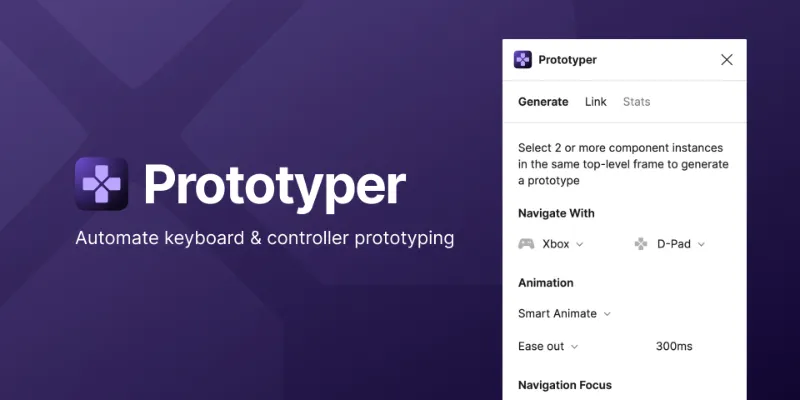
Prototyper is a free Figma plugin published by Aashrey Sharma in 2021. It works in Figma Design and has 15,708 users and 518 likes on the Figma Community. It ranks #9 in Prototyping on our lists.
In the developer's words
Create game controller and keyboard navigation prototypes in seconds with Prototyper. Used and trusted by designers at PlayStation, Riot Games, Blizzard, Epic Games, Amazon, Microsoft and more.
Learn how to use Prototyper
In this Game UI Prototyping talk, learn how to build a Game Inventory, Skill Tree and Quest Log prototype in under 10 minutes with Prototyper.
Create a prototype from existing mockups([demo](https://youtu.be/6KvnigBr6i4?t=1533))
- Select all top-level frames of your mockups.
- In Prototyper, go to the Link tab.
- Click Link.
Create a prototype from a single mockup ([demo](https://youtu.be/6KvnigBr6i4?t=1368))
- Create components for the UI elements you would like to navigate in your mockup. For each component, add a component property to change between an unfocused and focused visual state. Now replace the UI elements with instances of the components you just created.
- In the top-level frame of your mockup, select the component instances.
- In Prototyper, under Navigation Focus type the name of the component property that controls focus, and the values that represent the unfocused and focused states.
- Click Generate.
Prototype interactions will be automatically assigned based on how the selected elements are arranged. For example, mockups or elements arranged horizontally will be navigable with left and right inputs.
Privacy & Network Access
Prototyper is completely private. It runs locally in your file and does not make any network calls. All stats are also calculated and stored on your computer.
Open Source
Prototyper is open source and contributions are welcome!
Contributors
- Alex Tokmakchiev - PlayStation Controller Keycodes
- Antoine Plu - PlayStation Controller icons
What's new
Version 40 · released Aug 2, 2024
- Fixed the "cannot read property 'Symbol.iterator' of undefined" error introduced in update 39 when using keyboard navigation.
Permissions and privacy
Network access
Prototyper declares no network access, so it runs entirely inside Figma and can't send your file anywhere.
Extra permissions
None beyond the standard access to the file you run it in.
Read from the plugin's published manifest. Questions about data handling go to the developer's support page.
Where Prototyper ranks
Prototyper alternatives
- 1

ProtoPie
by ProtoPie
199K users3.4KFree + paid featuresHigh-fidelity prototyping for Figma. Import Figma designs and add dynamic, conditional interactions.
- 2

Attention Insight: AI heatmap, clarity score, focus map, contrast map
by Donatas Puidokas
78K users1.5KFree + paid featuresInstantly generate AI heatmaps with predictive eye-tracking technology. Boost conversions.
- 3

Axure
by Axure
49K users1.2KFreeImport and transform your designs into rich, interactive prototypes with the power of Axure RP
- 4
Prototyper
by Jordan Singer
43K users1.4KFreePowerful prototyping with code
- 5

Interactive Input Fields
by Florian Voit
24K users566Free + $6/mo upgradeEasily create highly interactive & custom input fields for your prototypes – directly in Figma.
- 6
Interactive Typing Input
by Philips
23K users207FreeVariable-controlled, scaleable, interactive input component for typing on prototype..
Prototyper FAQ
What does Prototyper do?
Add game controller and keyboard navigation to your prototypes in seconds. It's a Figma plugin by Aashrey Sharma that runs in Figma Design.
Is Prototyper free?
Yes. Prototyper is free to install and run from the Figma Community, with no paid tier listed.
Is Prototyper safe to use?
Figma plugins can only reach the internet through domains listed in their manifest. Prototyper declares no network access, so it runs entirely inside Figma and can't send your file anywhere. As with any plugin, check the developer's privacy policy before using it on client work.
How do I install Prototyper?
Open it on the Figma Community, or search for it in the Actions menu (Cmd/Ctrl + K) inside any file you can edit. See how to install Figma plugins.
What are the best alternatives to Prototyper?
By user count, the closest alternatives are ProtoPie, Attention Insight: AI heatmap, clarity score, focus map, contrast map and Axure. Compare all of them on the best Figma plugins for prototyping.
Built this plugin?
Use this page as a landing page for Prototyper: link to it from your site, README or launch posts, or add a badge. Pick a style and copy the code.

Style
Label
Size
Code
<a href="https://figmaplugins.co/plugins/prototyper-aashreys/" target="_blank" rel="noopener"><img src="https://figmaplugins.co/badges/featured-dark.svg" alt="Prototyper by Aashrey Sharma on figmaplugins.co" width="220" height="48"></a>