
About UXPin
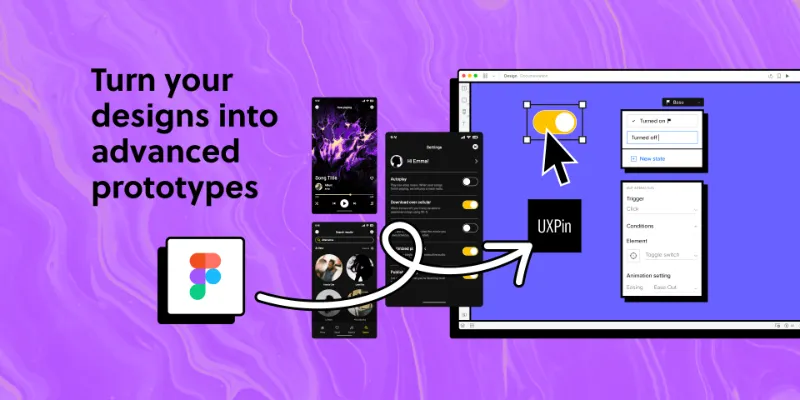
UXPin is a free + paid features Figma plugin published by UXPin in 2022. It works in Figma Design and has 8,127 users and 105 likes on the Figma Community. It ranks #17 in Prototyping on our lists.
In the developer's words
Bring your UI to life – add advanced interactivity to your designs and show, not tell.
What you can do:
⤴️ Export your designs in 3 clicks
Easily copy and paste your Figma designs to UXPin.
🎨 Build prototypes with the level of interactivity like never before
Use States, Variables, and Conditional Interactions to achieve fully immersive experience.
💬Gather reliable feedback
Share your hi-fi prototypes that perfectly mimic the end product and let stakeholders and your team drop comments.
🔗 Ease the handoff
Send a link to the prototype with automatic spec mode that also generates CSS code for each component.
✨ Enhance your design’s interactivity
Elevate your Figma UIs with interactive native web components (like text forms and checkboxes) or mix it up with code-based components that come straight from a design system via Storybook, or Git integrations. Add to your Figma UI some coded components that come from your team’s design system or an open-source.
Bring your Figma designs and add more advanced interactivity to them in UXPin – available in the browser and as a desktop app on macOS and Windows. Try now for free: https://www.uxpin.com/
Author’s note
This plugin still has a few technical limitations, but we’re working to refine it over time with help from the design community. Your feedback plays a big role in shaping future improvements, so if you have ideas or suggestions, we’d love to hear them at hello@uxpin.com.
What's new
Version 34 · released Aug 12, 2025
- Fixed export issue with nested non-solid strokes.
- Improved import of non-solid strokes (first used color now applied).
- Fixed handling of masks with multiple groups – some complex masks may still require manual unmasking in UXPin.
- Fixed export error when text node has no content.
Permissions and privacy
Network access
UXPin can only connect to the domain declared in its manifest: uxpin.s3.amazonaws.com.
- uxpin.s3.amazonaws.com
Extra permissions
None beyond the standard access to the file you run it in.
Read from the plugin's published manifest.
Where UXPin ranks
UXPin alternatives
- 1

ProtoPie
by ProtoPie
199K users3.4KFree + paid featuresHigh-fidelity prototyping for Figma. Import Figma designs and add dynamic, conditional interactions.
- 2

Attention Insight: AI heatmap, clarity score, focus map, contrast map
by Donatas Puidokas
78K users1.5KFree + paid featuresInstantly generate AI heatmaps with predictive eye-tracking technology. Boost conversions.
- 3

Axure
by Axure
49K users1.2KFreeImport and transform your designs into rich, interactive prototypes with the power of Axure RP
- 4
Prototyper
by Jordan Singer
43K users1.4KFreePowerful prototyping with code
- 5

Interactive Input Fields
by Florian Voit
24K users566Free + $6/mo upgradeEasily create highly interactive & custom input fields for your prototypes – directly in Figma.
- 6
Interactive Typing Input
by Philips
23K users207FreeVariable-controlled, scaleable, interactive input component for typing on prototype..
UXPin FAQ
What does UXPin do?
Bring your UI to life with advanced interactivity. It's a Figma plugin by UXPin that runs in Figma Design.
Is UXPin free?
UXPin is free to install, but some features are unlocked through a paid plan on the developer's site.
Is UXPin safe to use?
Figma plugins can only reach the internet through domains listed in their manifest. UXPin can only connect to the domain declared in its manifest: uxpin.s3.amazonaws.com. As with any plugin, check the developer's privacy policy before using it on client work.
How do I install UXPin?
Open it on the Figma Community, or search for it in the Actions menu (Cmd/Ctrl + K) inside any file you can edit. See how to install Figma plugins.
What are the best alternatives to UXPin?
By user count, the closest alternatives are ProtoPie, Attention Insight: AI heatmap, clarity score, focus map, contrast map and Axure. Compare all of them on the best Figma plugins for prototyping.
Built this plugin?
Use this page as a landing page for UXPin: link to it from your site, README or launch posts, or add a badge. Pick a style and copy the code.

Style
Label
Size
Code
<a href="https://figmaplugins.co/plugins/uxpin/" target="_blank" rel="noopener"><img src="https://figmaplugins.co/badges/featured-dark.svg" alt="UXPin on figmaplugins.co" width="220" height="48"></a>