
On this page
About Figma to HTML and CSS
Figma to HTML and CSS is a free Figma plugin published by Luba Karpenko in 2022. It works in Figma Design and FigJam and has 184,380 users and 872 likes on the Figma Community. It ranks #11 in Figma to Code on our lists.
In the developer's words
Convert Figma designs into editable HTML and CSS.
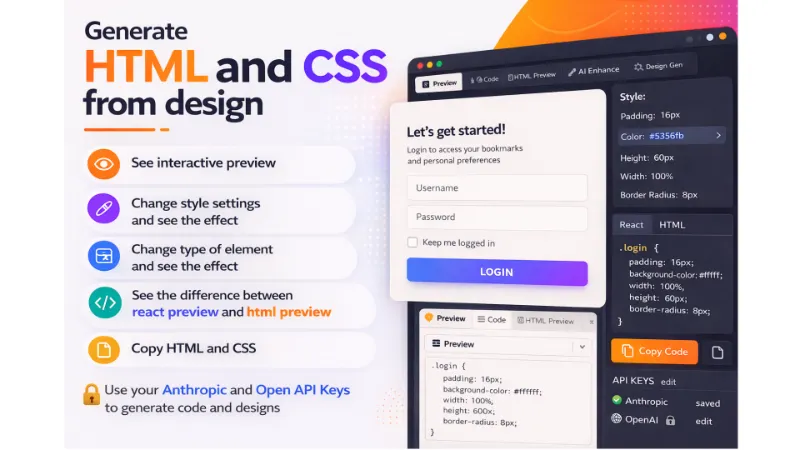
Figma to HTML and CSS helps designers and developers turn selected Figma designs into code they can preview, inspect, modify, and copy. Generate HTML and CSS, change an element’s type or style settings, compare HTML and React previews, and see the result immediately.
For AI-assisted design-to-code workflows, you can connect your own OpenAI or Anthropic API key to generate code and explore design ideas.
WHAT CAN FIGMA TO HTML AND CSS DO?
• Generate HTML and CSS from a selected Figma design
• Display the generated result in an interactive preview
• Let you change an element’s HTML type
• Let you adjust style settings and immediately see the effect
• Compare HTML and React preview modes
• Copy generated HTML and CSS into your project
• Use your own OpenAI or Anthropic API key for AI-assisted generation
• Help you move faster from design exploration to the first implementation
HOW DO I CONVERT A FIGMA DESIGN TO HTML AND CSS?
1. Select the frame or design you want to convert.
2. Open the Figma to HTML and CSS plugin.
3. Generate the initial code.
4. Review the result in the interactive preview.
5. Change element types or style settings where needed.
6. Compare the HTML and React previews.
7. Copy the HTML and CSS into your project.
8. Review and adapt the generated code before production use.
CAN FIGMA GENERATE HTML AND CSS?
Figma is primarily a design tool. It does not automatically turn every design into production-ready HTML and CSS.
Figma to HTML and CSS adds a design-to-code workflow inside Figma. It reads the selected design, generates an editable implementation, and lets you review the visual result before copying the code.
The generated code is intended to accelerate the first implementation pass. Frontend review is still important.
HOW DOES AI CONVERT A FIGMA DESIGN TO CODE?
AI-assisted design-to-code tools examine visual structure, text, spacing, styles, and element relationships. They then suggest a corresponding code structure.
With this plugin, you can connect your own OpenAI or Anthropic API key and use the selected provider for code and design generation.
AI works best when the original Figma design is organized clearly. Named layers, editable text, consistent styles, frames, components, and Auto Layout make the intended structure easier to understand.
DOES THE PLUGIN SUPPORT REACT?
The plugin includes HTML and React preview modes, allowing you to compare how the design behaves in each rendering approach.
Application-specific React architecture, state management, routing, data loading, validation, and business logic should still be implemented and reviewed inside your development project.
CAN I CHANGE THE GENERATED HTML ELEMENTS?
Yes. You can change an element’s type and immediately inspect the effect in the preview.
This is useful when a visually similar element needs a different semantic role. For example, an action may need to be represented as a button, while a navigation destination may need to be represented as a link.
IS AI-GENERATED FIGMA CODE PRODUCTION-READY?
Generated code should be treated as an editable starting point rather than an automatic replacement for frontend engineering.
Before using the result in production, review:
• Semantic HTML structure
• Heading hierarchy
• Responsive behavior
• Keyboard navigation
• Image alternative text
• Form labels
• Color contrast
• Focus states
• Font and asset loading
• Browser compatibility
• Performance
• React component boundaries
• Application state and business logic
The plugin reduces repetitive reconstruction work so you can spend more time on product behavior, accessibility, integration, and refinement.
DOES AI REPLACE THE FRONTEND DEVELOPER?
No. AI can accelerate the translation of visual structure into an initial implementation, but it cannot reliably infer every product requirement from the design alone.
A Figma frame may show how a page looks, but it may not explain:
• Whether an element is a link or a button
• What happens after an interaction
• Which content is loaded dynamically
• How errors and empty states work
• Which accessibility behavior is required
What's new
Version 69 · released Mar 12, 2026
- Make css closer to it's original settings on figma
Permissions and privacy
Network access
Figma to HTML and CSS can only connect to the 5 domains declared in its manifest: www.figma.com, api.anthropic.com, api.openai.com, loremflickr.com and picsum.photos.
- www.figma.com
- api.anthropic.com
- api.openai.com
- loremflickr.com
- picsum.photos
Extra permissions
None beyond the standard access to the file you run it in.
Read from the plugin's published manifest.
Where Figma to HTML and CSS ranks
Figma to HTML and CSS alternatives
- 1

Figma to Code
by Bernardo Ferrari
2.4M users8.9KFreeCode Conversion Made Easy: Figma to Web & Apps
- 2

Anima
by Anima
1.9M users18KFreeAnima - AI Design to code, Vibe code, Vibe design
- 3

Builder.io
by Steve Sewell
1.3M users23KFreeExport designs to clean, responsive code or turn Figma screens into AI apps and prototypes.
- 4
Figma to HTML
by Figma2HTML
688K users7KFreeConvert Figma design to HTML
- 5

Figma to HTML with Framer
by Framer
643K users12KFreeConvert your Figma design to HTML code in seconds with Framer.
- 6

Locofy Lightning
by Locofy.ai
608K users5.4KFreeConvert Figma designs to code in a flash: React, React Native, Flutter, HTML/CSS, Angular, Next, Vue
Figma to HTML and CSS FAQ
What does Figma to HTML and CSS do?
Figma to HTML and CSS. It's a Figma plugin by Luba Karpenko that runs in Figma Design and FigJam.
Is Figma to HTML and CSS free?
Yes. Figma to HTML and CSS is free to install and run from the Figma Community, with no paid tier listed.
Is Figma to HTML and CSS safe to use?
Figma plugins can only reach the internet through domains listed in their manifest. Figma to HTML and CSS can only connect to the 5 domains declared in its manifest: www.figma.com, api.anthropic.com, api.openai.com, loremflickr.com and picsum.photos. As with any plugin, check the developer's privacy policy before using it on client work.
How do I install Figma to HTML and CSS?
Open it on the Figma Community, or search for it in the Actions menu (Cmd/Ctrl + K) inside any file you can edit. See how to install Figma plugins.
What are the best alternatives to Figma to HTML and CSS?
By user count, the closest alternatives are Figma to Code, Anima and Builder.io. Compare all of them on the best Figma plugins for figma to code.
Built this plugin?
Use this page as a landing page for Figma to HTML and CSS: link to it from your site, README or launch posts, or add a badge. Pick a style and copy the code.

Style
Label
Size
Code
<a href="https://figmaplugins.co/plugins/figma-to-html-and-css/" target="_blank" rel="noopener"><img src="https://figmaplugins.co/badges/featured-dark.svg" alt="Figma to HTML and CSS on figmaplugins.co" width="220" height="48"></a>Want it featured on figmaplugins.co? Submit it for review