
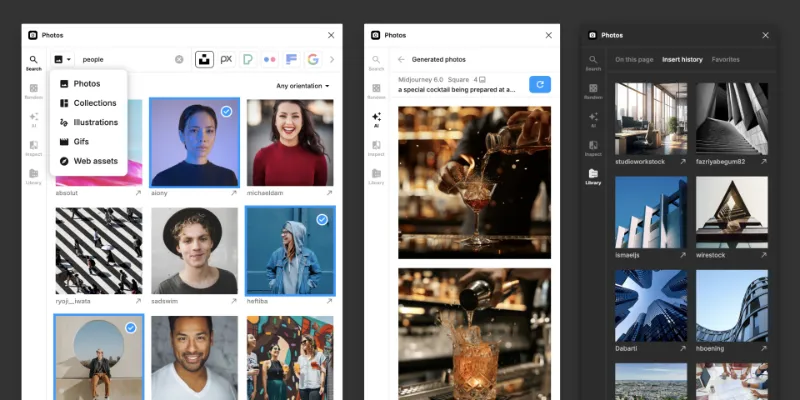
About Photos
Photos is a free Figma plugin with a paid upgrade ($25) published by Emin Sinani in 2019. It works in Figma Design, Figma Slides and FigJam and has 287,749 users and 1,053 likes on the Figma Community. It ranks #6 in Images & Stock Photos on our lists.
In the developer's words
The most powerful plugin for populating your designs with photos
Features
- Search and insert photos, gifs and illustrations from various providers including Unsplash, Pixabay, Pexels, Flickr and many more
- Quickly insert a random set of photos
- Generate custom AI photos using various providers including Midjourney, Flux, Google, OpenAI and many more
- Edit your photos with AI: Remove background, Upscale, Expand, Erase, Area fill, Replace, Text edit and Create variations
- Extract photos from almost any website
- Inspect photos on the canvas and view details and get color palette
- Find similar and matching photos from your canvas or search results
- Save your favorite photos and user across files
- See which photos you have inserted and find back the original files
- This plugin is available for Figma, FigJam and Slides
Free vs Pro
Free version
- Limited features
- 20 AI credits
Pro version
- Unlimited access to all features
- 200 AI credits with option to purchase additional credits
Good to know
Notes
- Photo and user links can be found below the images
- The Web Assets feature can extract photos from many websites, but some sites will not work due to security reasons
- Some providers only provide watermarked photos, but in you can often find a matching original photo or similar photos using the image search feature
Privacy policy
- When using photos in your designs, please make sure to review the license information for both commercial and non-commercial use. This plugin cannot be held accountable for the wrongful usage of licenses.
- This plugin tracks minimal usage data to optimize features and performance. No personal data is being tracked.
What's new
Version 213 · released Jun 15, 2025
The developer didn't publish release notes for this version.
Permissions and privacy
Network access
Photos's manifest allows network access to any domain ("*"), so Figma doesn't limit where it can send data.
- *
Extra permissions
- Reads your Figma name and avatar
- Can offer paid features through Figma's checkout
Read from the plugin's published manifest.
Where Photos ranks
Photos alternatives
- 1

Unsplash
by Unsplash
3.8M users33KFreeInsert beautiful images from Unsplash into your designs.
- 2

Photopea
by Patrik Schiller
461K users7.4KFreeOnline Photo Editor
- 3

Pexels
by Pablo Fernandez
431K users2.9KFreeAdd completely free images to your designs directly from Pexels
- 4

Image Palette
by Matt DesLauriers
368K users5.6KFree - 5

Filter / effects
by Andreslav Kozlov
354K users4.2KFree + paid featuresModify images more than 50 different effects right in Figma!
- 6

Insert Big Image
by Yuan Qing Lim
234K users4.1KFree + paid featuresInsert and retain the original resolution of big images
Photos FAQ
What does Photos do?
Search, generate and insert photos from various providers. It's a Figma plugin by Emin Sinani that runs in Figma Design, Figma Slides and FigJam.
Is Photos free?
Partly. Photos is free to install and use, and a paid upgrade on the Figma Community ($25 one-time) unlocks the rest.
Is Photos safe to use?
Figma plugins can only reach the internet through domains listed in their manifest. Photos's manifest allows network access to any domain ("*"), so Figma doesn't limit where it can send data. As with any plugin, check the developer's privacy policy before using it on client work.
How do I install Photos?
Open it on the Figma Community, or search for it in the Actions menu (Cmd/Ctrl + K) inside any file you can edit. See how to install Figma plugins.
What are the best alternatives to Photos?
By user count, the closest alternatives are Unsplash, Photopea and Pexels. Compare all of them on the best Figma plugins for images & stock photos.
Built this plugin?
Use this page as a landing page for Photos: link to it from your site, README or launch posts, or add a badge. Pick a style and copy the code.

Style
Label
Size
Code
<a href="https://figmaplugins.co/plugins/photos/" target="_blank" rel="noopener"><img src="https://figmaplugins.co/badges/featured-dark.svg" alt="Photos on figmaplugins.co" width="220" height="48"></a>