
On this page
About Export Figma to Websites and HTML by Siter.io
Export Figma to Websites and HTML by Siter.io is a free + paid features Figma plugin published by Designmodo in 2021. It works in Figma Design and has 137,147 users and 1,767 likes on the Figma Community. It ranks #14 in Figma to Code and #15 in Import & Export on our lists.
In the developer's words
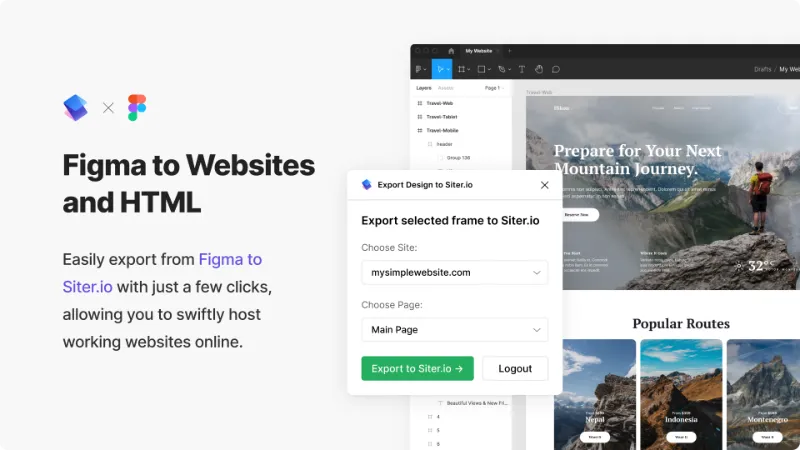
Siter.io is a website builder that lets you create and publish entire websites without any coding at all. It works by directly exporting Figma design files without hassle of converting your layout into HTML and CSS. After the export, you can make changes and adjustments directly on Siter.io, and easily add responsive versions for your pages.
Also, you can embed/insert HTML code directly on your websites through your visual editor on Siter.io.
How Figma to HTML Website works:
- Install the plugin
- In Figma select the art-board with your website
- Choose "Plugins" and click on Export Figma to Websites / HTML by Siter.io
- Pair theSiter.io with Figma
- Export your designs!
Watch video -> https://www.youtube.com/watch?v=BG8rsZdR_SQ
Download HTML code from Figma -> https://help.siter.io/article/210-download-html
Static HTML hosting -> https://static.app/
Suggestions? →https://siter.io/
Status -> https://status.siter.io/
*A Designmodo project.
What's new
Version 51 · released Aug 28, 2025
The developer didn't publish release notes for this version.
Permissions and privacy
Network access
Export Figma to Websites and HTML by Siter.io can only connect to the 4 domains declared in its manifest: api.siter.io, fonts.googleapis.com, fonts.gstatic.com and *.ingest.sentry.io.
- api.siter.io
- fonts.googleapis.com
- fonts.gstatic.com
- *.ingest.sentry.io
Extra permissions
None beyond the standard access to the file you run it in.
Read from the plugin's published manifest.
Where Export Figma to Websites and HTML by Siter.io ranks
Export Figma to Websites and HTML by Siter.io alternatives
- 1

Figma to Code
by Bernardo Ferrari
2.3M users8.5KFreeCode Conversion Made Easy: Figma to Web & Apps
- 2

Anima
by Anima
1.8M users17KFreeAnima - AI Powered Design to code
- 3

Builder.io
by Steve Sewell
1.3M users23KFreeExport designs to clean, responsive code or turn Figma screens into AI apps and prototypes.
- 4

Figma to HTML
by Figma2HTML
670K users6.7KFreeConvert Figma design to HTML
- 5

Figma to HTML with Framer
by Framer
612K users11KFreeConvert your Figma design to HTML code in seconds with Framer.
- 6

Locofy Lightning
by Locofy.ai
594K users5.3KFreeConvert Figma designs to code in a flash: React, React Native, Flutter, HTML/CSS, Angular, Next, Vue
Export Figma to Websites and HTML by Siter.io FAQ
What does Export Figma to Websites and HTML by Siter.io do?
Publish Figma designs as websites without the need for coding. Embed HTML code into your website. It's a Figma plugin by Designmodo that runs in Figma Design.
Is Export Figma to Websites and HTML by Siter.io free?
Export Figma to Websites and HTML by Siter.io is free to install, but some features are unlocked through a paid plan on the developer's site.
Is Export Figma to Websites and HTML by Siter.io safe to use?
Figma plugins can only reach the internet through domains listed in their manifest. Export Figma to Websites and HTML by Siter.io can only connect to the 4 domains declared in its manifest: api.siter.io, fonts.googleapis.com, fonts.gstatic.com and *.ingest.sentry.io. As with any plugin, check the developer's privacy policy before using it on client work.
How do I install Export Figma to Websites and HTML by Siter.io?
Open it on the Figma Community, or search for it in the Actions menu (Cmd/Ctrl + K) inside any file you can edit. See how to install Figma plugins.
What are the best alternatives to Export Figma to Websites and HTML by Siter.io?
By user count, the closest alternatives are Figma to Code, Anima and Builder.io. Compare all of them on the best Figma plugins for figma to code.
Built this plugin?
Use this page as a landing page for Export Figma to Websites and HTML by Siter.io: link to it from your site, README or launch posts, or add a badge. Pick a style and copy the code.

Style
Label
Size
Code
<a href="https://figmaplugins.co/plugins/export-figma-to-websites-and-html-by-siter-io/" target="_blank" rel="noopener"><img src="https://figmaplugins.co/badges/featured-dark.svg" alt="Export Figma to Websites and HTML by Siter.io on figmaplugins.co" width="220" height="48"></a>