
On this page
About Image Colorizer
Image Colorizer is a free Figma plugin published by Dára Sobaloju in 2024. It works in Figma Design and has 61,324 users and 459 likes on the Figma Community. It ranks #10 in Images & Stock Photos on our lists.
In the developer's words
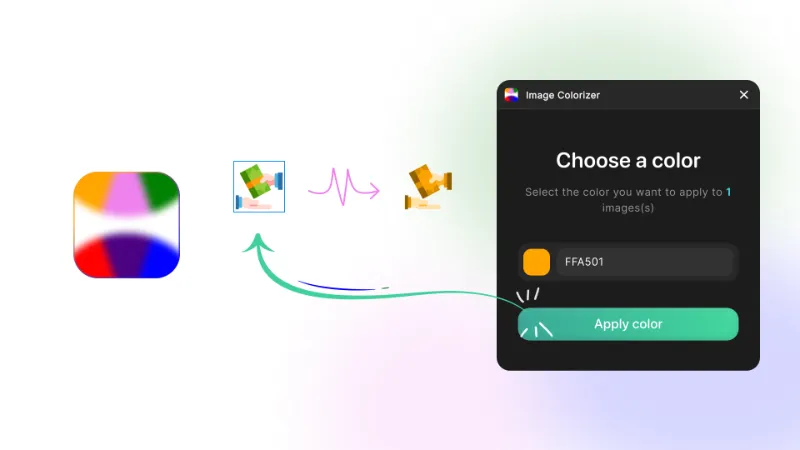
With one click, Image Colorizer allows you to change the color of selected images (from icons to photos) in your Figma designs while preserving intricate details.
Key features include:
- Apply custom colors to multiple images simultaneously
- Preserve image details using advanced blending techniques
- Generate high-resolution versions of colorized images
- Simple, intuitive interface for quick color changes
Perfect for creating color variations of icons, illustrations, or photos without leaving Figma.
How to use:
- Open the plugin
- Select the images you want to apply color to (up to 28 images)
- Use an image background remover plugin to remove backgrounds (if needed)
Streamline your workflow and explore new color palettes with ease!
❤️ If this plugin saved you time or helped you out, consider buying me a coffee! ☕️
What's new
Version 5 · released Jul 23, 2025
- You can now change colours of images with black fill. Enjoy!
Permissions and privacy
Network access
Image Colorizer declares no network access, so it runs entirely inside Figma and can't send your file anywhere.
Extra permissions
None beyond the standard access to the file you run it in.
Read from the plugin's published manifest.
Where Image Colorizer ranks
Image Colorizer alternatives
- 1

Photopea
by Patrik Schiller
441K users7.1KFreeOnline Photo Editor
- 2

Filter / effects
by Andreslav Kozlov
342K users4KFree + paid featuresModify images more than 50 different effects right in Figma!
- 3

Insert Big Image
by Yuan Qing Lim
224K users4KFree + paid featuresInsert and retain the original resolution of big images
- 4
Color Overlay
by Jaclyn Tan
209K users1.3KFree + $10 upgradeRecolor raster images quickly and easily
- 5

Downsize
by Alex Einarsson
147K users2.2KFreeCompress and resize images without leaving Figma!
- 6
Image Editor
by Pavel Laptev
129K users2.4KFreeeditor, photo, image editor, photoshop, image filter
Image Colorizer FAQ
What does Image Colorizer do?
Easily change image colors with one click while preserving details. It's a Figma plugin by Dára Sobaloju that runs in Figma Design.
Is Image Colorizer free?
Yes. Image Colorizer is free to install and run from the Figma Community, with no paid tier listed.
Is Image Colorizer safe to use?
Figma plugins can only reach the internet through domains listed in their manifest. Image Colorizer declares no network access, so it runs entirely inside Figma and can't send your file anywhere. As with any plugin, check the developer's privacy policy before using it on client work.
How do I install Image Colorizer?
Open it on the Figma Community, or search for it in the Actions menu (Cmd/Ctrl + K) inside any file you can edit. See how to install Figma plugins.
What are the best alternatives to Image Colorizer?
By user count, the closest alternatives are Photopea, Filter / effects and Insert Big Image. Compare all of them on the best Figma plugins for images & stock photos.
Built this plugin?
Use this page as a landing page for Image Colorizer: link to it from your site, README or launch posts, or add a badge. Pick a style and copy the code.

Style
Label
Size
Code
<a href="https://figmaplugins.co/plugins/image-colorizer/" target="_blank" rel="noopener"><img src="https://figmaplugins.co/badges/featured-dark.svg" alt="Image Colorizer on figmaplugins.co" width="220" height="48"></a>