
On this page
About JSON → Content
JSON → Content is a free Figma plugin published by Lucas Dietrich in 2020. It works in Figma Design and has 16,704 users and 226 likes on the Figma Community. It ranks #11 in Mock Data & Content on our lists.
In the developer's words
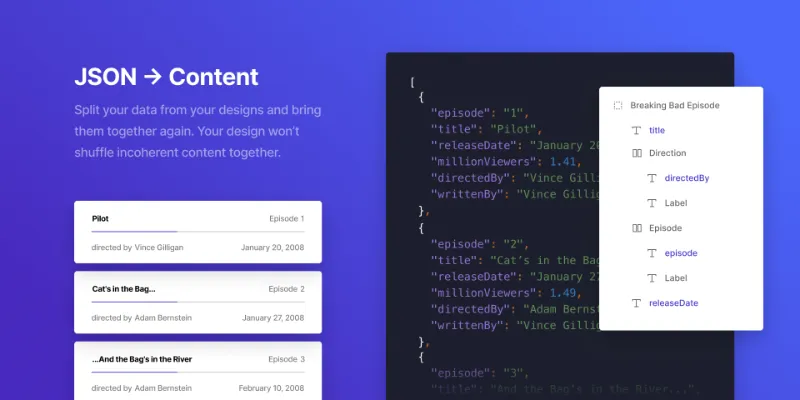
Easily map your data and layers together by using the same name. Either select specific entries from your overview or shuffle through them for a randomised dataset
Tired of incoherent random data?
Set up your data separately as a JSON or CSV file and start adding your content. The content of the datasets always remain together to create a seamless data retrieval experience.
Easy mapping via layer name
Map your data and your layers together simply by using the same name. The name of your text layers only needs to match the key of your object and the value will be parsed.
Selection rewriting
Overwrite multiple text layers within your selection and any data that’s attached to the entry will be written into layers that have the same name as the key.
Choose between specific or randomised data
When you have imported your data, the plugin will print a list with every entry that’s in your file. Click on an entry if you need specific data from that set.
Multiple datasets via tab menu
Push your productivity even more with the new tab menu feature. It's now possible to set up multiple datasets without switching between files.
Iterate over random entries
Iterate over multiple entries of your list to your selection. The next entry will be used as soon as the same data would be applied a second time.
You can now utilize the power of layered JSON files if needed. This is a much more common way of writing JSON and allows for more flexibility. Files which have worked before will work as expected.
What's new
Version 10 · released Oct 7, 2022
- Added multi-layered JSON capability
Permissions and privacy
Network access
This plugin's manifest doesn't declare its network access, which is common for older plugins. Figma shows a warning on the Community page for plugins like this.
Extra permissions
None beyond the standard access to the file you run it in.
Read from the plugin's published manifest.
Where JSON → Content ranks
JSON → Content alternatives
- 1

Content Reel
by Eugene Gavriloff
1.1M users16KFreeDesign layouts more efficiently by pulling text strings, images, and icons.
- 2

Logoipsum
by Rizal Renaldi
167K users720FreeLorem ipsum of logo
- 3

JSON to Figma
by Pavel Laptev
87K users931Free + $17 upgradejson, population, images
- 4

Avatars
by Alohe
68K users868FreeAvatars is a comprehensive collection of diverse and eye-catching avatar images
- 5

FishText in Russian by Pavel Sherer
by Pavel Sherer
50K users721FreeСамый удобный генератор случайного текста, умный Lorem Ipsum на русском языке
- 6

Faker
by Cory Etzkorn
50K users762FreeRealistic placeholder text. Names, emails, URLs, headlines, and more.
JSON → Content FAQ
What does JSON → Content do?
It's a Figma plugin by Lucas Dietrich that runs in Figma Design.
Is JSON → Content free?
Yes. JSON → Content is free to install and run from the Figma Community, with no paid tier listed.
How do I install JSON → Content?
Open it on the Figma Community, or search for it in the Actions menu (Cmd/Ctrl + K) inside any file you can edit. See how to install Figma plugins.
What are the best alternatives to JSON → Content?
By user count, the closest alternatives are Content Reel, Logoipsum and JSON to Figma. Compare all of them on the best Figma plugins for mock data & content.
Built this plugin?
Use this page as a landing page for JSON → Content: link to it from your site, README or launch posts, or add a badge. Pick a style and copy the code.

Style
Label
Size
Code
<a href="https://figmaplugins.co/plugins/json-content/" target="_blank" rel="noopener"><img src="https://figmaplugins.co/badges/featured-dark.svg" alt="JSON → Content on figmaplugins.co" width="220" height="48"></a>